Your TV is off. Your coffee maker isn’t brewing. Your phone charger is sitting unused in the outlet. But some of these devices may still be using electricity.
This hidden electricity consumption is called phantom power, also known as standby power or vampire energy. It happens when electronics continue drawing electricity even though you’re not actively using them.
Read Also: What Uses the Most Electricity in Your Home? (Appliance kWh Chart)
For homeowners and renters, these small amounts of electricity can add up across dozens of devices.
The good news is that reducing unnecessary standby consumption usually doesn’t require expensive equipment, electrical work, or major lifestyle changes.
This guide explains which household devices use electricity when turned off, how much that electricity might cost, and how to identify the biggest opportunities for savings.
You’ll also learn when unplugging makes sense, when a smart power strip is worth considering, and which devices should stay connected.
Quick Takeaways
- Phantom power is electricity consumed by devices that appear turned off but remain connected to power.
- TVs, gaming consoles, computers, printers, and entertainment equipment are common sources.
- Not every plugged-in device consumes meaningful electricity when switched off.
- A plug-in electricity meter can help identify devices worth addressing.
- Smart power strips can automatically disconnect selected electronics when they’re not needed.
- Unplugging chargers and accessories may help, but savings from modern unused chargers are often small.
- Never disconnect essential equipment such as medical devices, smoke alarms, or necessary network equipment just to save electricity.
- The biggest opportunities usually come from devices with higher standby consumption that remain plugged in all year.
What Is Phantom Power?
Phantom power is the electricity certain appliances and electronics consume while they are turned off, sleeping, or waiting for instructions.
The technical term is standby power.
Read Also: Which Home Energy Upgrade Should You Do First? (Priority Guide)
Many modern devices never completely shut down when you press their power buttons. Instead, they enter a low-power state that allows them to respond quickly when needed.
For example, a television may continue using electricity to receive remote-control signals. A gaming console might maintain an internet connection to download updates.
A microwave may use a small amount of electricity to operate its clock and electronic controls.
These functions require energy even when the appliance isn’t performing its main job.
Why Do Devices Continue Using Electricity?
Manufacturers include standby functions for convenience, connectivity, and faster startup.
Common examples include:
- Remote-control receivers
- Digital clocks and displays
- Wi-Fi and Bluetooth connections
- Automatic software updates
- Voice assistant listening functions
- Power supplies that remain energized
- Quick-start and instant-on features
A device with several standby features may consume more electricity than a simpler model.
However, modern electronics can be substantially more efficient than older products.
Read Also: How to Lower Your Electric Bill: 35 Proven Ways (Room-by-Room Checklist)
An unused phone charger, for example, may draw very little electricity when nothing is connected.
That’s why measuring electricity consumption is often more useful than assuming every plugged-in device is wasting significant energy.
Phantom Power vs. Normal Electricity Use
There is an important distinction between unnecessary standby consumption and electricity used for an essential function.
A refrigerator uses electricity between cooling cycles to monitor temperature and control its compressor. That isn’t necessarily avoidable waste.
Likewise, a Wi-Fi router uses electricity continuously because maintaining an internet connection is its primary function.
For this article, the focus is on electricity consumed when a device isn’t actively providing a service you need.
Understanding that difference helps prevent inconvenience and unsafe attempts to eliminate every watt of standby consumption.
Which Devices Use Electricity When Off?
Some household devices are more likely than others to consume noticeable electricity while apparently switched off.
The amount depends on the model, age, settings, network connections, and available power-saving features.
A device’s electricity use should not be estimated from its size alone.
A large television with efficient standby electronics may consume less standby electricity than a smaller device that remains connected to the internet.
Read Also: Heat Pump Water Heater: Costs, Savings, and Is It Worth It?
Common Devices That Use Electricity When Off
The following table identifies equipment worth checking.
| Device | Why It May Use Standby Power | What to Check |
|---|---|---|
| Smart TV | Remote receiver, network connection, quick start | Eco mode and quick-start settings |
| Gaming console | Updates, downloads, instant resume | Energy-saving mode |
| Desktop computer | Sleep functions and network wake features | Sleep and shutdown settings |
| Computer monitor | Standby circuitry | Automatic sleep mode |
| Printer | Network availability and readiness | Deep-sleep settings |
| Cable or satellite box | Program guide, recording, network services | Provider-approved power-saving options |
| Streaming device | Background updates and connectivity | Sleep settings |
| Soundbar or receiver | Remote activation and wireless connections | Auto-standby settings |
| Microwave | Clock and electronic controls | Whether unplugging is practical |
| Coffee maker | Clock, display, programmable brewing | Unplug when appropriate |
| Phone charger | Small power-supply losses | Disconnect when convenient |
| Smart speaker | Continuous listening and connectivity | Whether the service is needed |
Important: These devices do not necessarily have high standby consumption. The table identifies common candidates for measurement, not confirmed energy wasters.
Entertainment Centers Can Be Worth Checking
An entertainment center may contain several connected devices:
- Television
- Gaming console
- Streaming player
- Sound system
- Cable box
- Powered speakers
Even if each device uses only a small amount of standby electricity, the combined load may be worth investigating.
Some equipment also has multiple standby modes.
For example, a gaming console’s low-energy shutdown setting may use less electricity than a mode that supports instant resume or background downloads.
Reviewing those settings is often the easiest first step.
Home Offices Have Similar Opportunities
Desktop computers, monitors, printers, docking stations, and powered speakers can remain connected for long periods.
A computer that stays in sleep mode overnight may consume more electricity than one that is fully shut down, depending on its hardware and settings.
However, repeatedly unplugging a computer isn’t necessary.
Use the operating system’s normal shutdown procedure and enable appropriate power-management settings.
For additional appliance-saving opportunities, see our guide to reducing household electricity use.
How Much Electricity Does Standby Power Use?
Standby electricity consumption is measured in watts.
A watt (W) measures the rate at which electricity is being used.
Electric utilities generally bill residential customers based on kilowatt-hours.
A kilowatt-hour (kWh) equals 1,000 watts of electricity used continuously for one hour.
For example:
A device using 10 watts for 100 hours consumes 1 kWh.
That makes it possible to estimate the annual cost of leaving a device connected.
Illustrative Standby Power Costs
The following table shows what different continuous standby loads would cost at an assumed electricity rate of $0.17 per kWh.
These are mathematical examples, not measured consumption figures for specific appliances.
| Continuous Standby Load | Annual Electricity Use | Annual Cost |
|---|---|---|
| 0.5 watts | 4.38 kWh | $0.74 |
| 1 watt | 8.76 kWh | $1.49 |
| 3 watts | 26.28 kWh | $4.47 |
| 5 watts | 43.8 kWh | $7.45 |
| 10 watts | 87.6 kWh | $14.89 |
| 20 watts | 175.2 kWh | $29.78 |
| 40 watts | 350.4 kWh | $59.57 |
A single device drawing less than 1 watt may cost very little to leave connected.
However, several devices with higher combined standby loads can produce a more noticeable annual expense.
Why Older Estimates Can Be Misleading
You may encounter articles claiming that standby electricity accounts for a fixed percentage of every household’s electricity bill.
Actual consumption varies considerably.
Modern appliance efficiency standards, ENERGY STAR specifications, and improved power supplies have reduced standby consumption in many products.
At the same time, connected devices have become more common.
A household with several gaming consoles, computers, and entertainment systems may have a different standby electricity profile than one with basic appliances.
The most reliable approach is to measure your own devices rather than apply a universal percentage.
How to Find Phantom Power in Your Home
You don’t need specialized electrical knowledge to investigate standby electricity consumption.
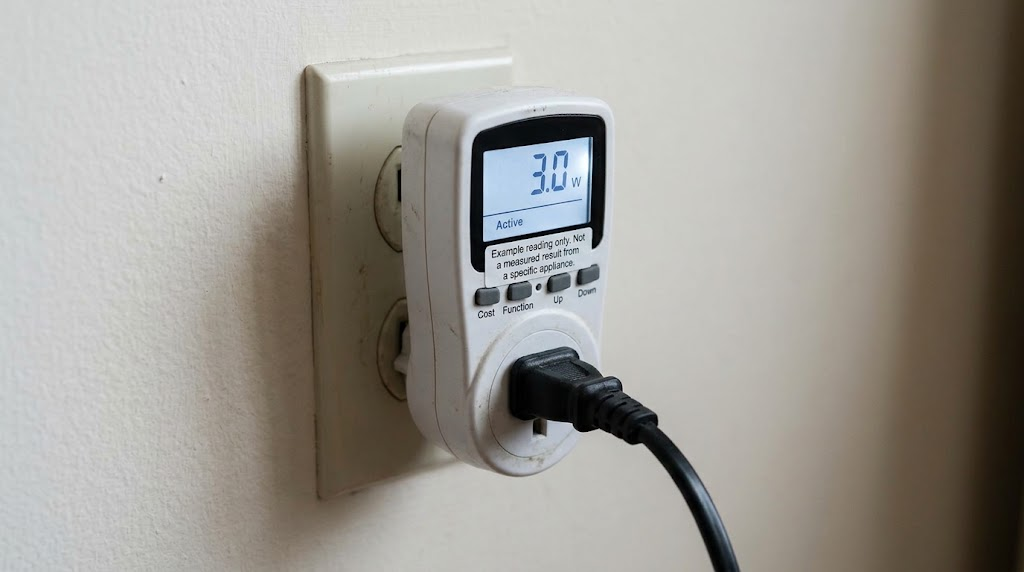
A basic plug-in electricity usage meter can provide useful information.
These devices fit between a standard wall outlet and an appliance’s power cord.
They measure how much electricity the connected equipment uses.
Step-by-Step: Measure Standby Electricity
1. Choose a suitable plug-in electricity meter.
Look for a meter that displays watts and accumulated kilowatt-hours.
Confirm that it is appropriately safety-certified and rated for the electrical load you intend to measure.
Some meters are designed only for standard 120-volt household outlets.
2. Turn off the appliance normally.
Use the remote control, power button, or manufacturer-recommended shutdown procedure.
Wait several minutes because some electronics continue performing tasks immediately after shutdown.
3. Connect the meter.
Unplug the appliance from the wall outlet.
Plug the meter into the outlet, then connect the appliance to the meter.
Follow the meter manufacturer’s instructions.
4. Read the standby wattage.
Look at the watt reading while the appliance is off.
If the reading fluctuates, observe it over several minutes.
Very low readings may be difficult for inexpensive meters to measure accurately.
5. Check different power modes.
Compare normal standby, quick-start mode, sleep mode, and full shutdown when those settings are available.
A device may have dramatically different electricity consumption depending on its settings.
6. Record the results.
Use the checklist below to prioritize your next steps.
Home Standby Power Checklist
| Area | Devices to Check | Action | Completed |
|---|---|---|---|
| Living room | TV, console, soundbar | Review standby settings | ☐ |
| Home office | Computer, monitor, printer | Enable sleep or shutdown | ☐ |
| Bedroom | TV, chargers, speakers | Disconnect unused equipment | ☐ |
| Kitchen | Coffee maker, small appliances | Unplug when practical | ☐ |
| Guest room | TV, chargers, electronics | Disconnect rarely used devices | ☐ |
| Garage | Chargers and electronic accessories | Check manufacturer guidance | ☐ |
| Entertainment center | Multiple connected devices | Consider a smart power strip | ☐ |
Can a Smart Plug Measure Electricity?
Some smart plugs include energy monitoring.
These can be useful when you want to track electricity consumption over several days.
However, not every smart plug measures power.
Some only allow remote switching.
Also, smart plugs consume electricity themselves. Their own power use can reduce the savings from disconnecting a very efficient device.
Choose an appropriately rated product and follow its instructions.
Never use an ordinary smart plug with a high-load appliance unless the manufacturer specifically permits that application.
How to Stop Vampire Energy
Reducing vampire energy doesn’t mean unplugging everything every night.
The goal is to eliminate electricity consumption that provides little or no value.
A few targeted changes are usually more practical than constantly managing every outlet.
1. Turn Off Unnecessary Quick-Start Features
Check your television, gaming console, and computer settings.
Look for options labeled:
- Quick Start
- Instant On
- Network Standby
- Fast Startup
- Eco Mode
- Power Saving
The exact names vary by manufacturer.
Disabling convenience features may increase startup time or stop background updates.
Choose settings that fit how you actually use the equipment.
2. Shut Down Computers When Appropriate
Use normal shutdown procedures when computers won’t be needed for extended periods.
For shorter breaks, sleep mode may offer a reasonable balance between convenience and electricity savings.
ENERGY STAR recommends using computer power-management features to reduce energy consumption.
Modern computers generally don’t need to remain fully active overnight unless they’re performing scheduled work.
3. Disconnect Rarely Used Electronics
Guest-room televisions, spare monitors, unused speakers, and seasonal electronics are reasonable candidates.
If a device goes unused for weeks or months, disconnecting it may eliminate its standby consumption.
Avoid unplugging equipment while updates, recording tasks, or shutdown procedures are in progress.
4. Use Switched Power Strips
A basic power strip with an on/off switch can disconnect several devices at once.
For example, a television, soundbar, and gaming accessories might share one strip if their combined electrical load stays within the strip’s rating.
Turn off the strip when none of those devices is needed.
Do not overload the strip or connect power strips together.
5. Review Appliance Settings
Some appliances provide an energy-saving or display-off mode.
Check the owner’s manual before changing settings.
For example, a printer’s deep-sleep setting may reduce electricity consumption without requiring you to unplug it.
Smart-home products may also offer schedules or reduced-power modes.
These adjustments can preserve useful functions while reducing unnecessary consumption.
Are Smart Power Strips Worth It?
A smart power strip is designed to manage electricity supplied to connected devices.
Some models use timers or app controls.
Others detect when a primary device turns off and automatically disconnect selected accessories.
These products can be useful when several electronics are normally used together.
How an Advanced Power Strip Works
Consider a home entertainment center.
The television is connected to a designated control outlet.
A soundbar and other accessories are connected to switched outlets.
When the television turns off, the strip detects the change and disconnects electricity to the selected accessories.
Some strips also provide always-on outlets for devices that need continuous power.
This arrangement can reduce unnecessary standby consumption without requiring you to unplug several cords.
However, automatic switching isn’t appropriate for every setup.
A gaming console may need time to shut down properly. A cable box may need continuous power to record scheduled programs.
Smart Power Strip vs. Regular Power Strip
| Feature | Basic Switched Strip | Advanced Power Strip | Energy-Monitoring Smart Plug |
|---|---|---|---|
| Disconnects power | Manually | Automatically or manually | App, schedule, or automation |
| Monitors electricity | Usually no | Model-dependent | Some models |
| Requires Wi-Fi | No | Often no | Usually |
| Typical convenience | Simple | High for grouped electronics | High for individual devices |
| Main drawback | Requires remembering | Compatibility and setup | Device itself uses electricity |
| Best use | Simple electronics | Entertainment or office setups | Measuring and scheduling |
How Much Should You Spend?
Basic switched power strips are generally less expensive than advanced models.
Smart plugs and energy-monitoring products vary widely in price.
Instead of selecting a product based on promised savings, compare its cost with the standby electricity you expect it to eliminate.
For example, suppose an advanced power strip costs $30.
If it eliminates 10 watts of continuous standby consumption at $0.17 per kWh, the theoretical annual electricity savings would be approximately $14.89.
The simple payback period would be:
$30 ÷ $14.89 = approximately 2 years.
But that example assumes the full 10-watt load is eliminated around the clock.
Actual savings could be lower because equipment may be actively used for part of the day, and the power strip may consume some electricity itself.
The product may still be worthwhile for convenience, but electricity savings alone may not justify every purchase.
Realistic Costs & Savings
The amount you can save depends on three main factors:
- How many watts of unnecessary standby electricity you eliminate.
- How many hours those devices would otherwise consume electricity.
- Your electricity rate.
You can estimate the cost using a simple formula.
Annual Electricity Cost Formula
Annual cost = (Watts × Hours per day × 365 ÷ 1,000) × Electricity rate
For this example, assume:
- A 2,000-square-foot home
- A mixed US climate
- Electricity costing $0.17 per kWh
- Several electronics with unnecessary standby loads
- No changes to heating, cooling, or major appliance operation
Home size and climate are background details here. They do not directly determine the standby electricity used by a particular device.
Worked Example: Reducing 25 Watts of Standby Load
Suppose a household identifies the following avoidable standby consumption:
| Equipment Group | Standby Load Eliminated |
|---|---|
| Entertainment accessories | 10 watts |
| Home office accessories | 8 watts |
| Guest-room electronics | 5 watts |
| Miscellaneous equipment | 2 watts |
| Total | 25 watts |
These figures are illustrative assumptions, not typical measured values for those devices.
If all 25 watts were eliminated continuously:
25 × 24 × 365 ÷ 1,000 = 219 kWh annually.
At $0.17 per kWh:
219 × $0.17 = $37.23 per year.
That is the theoretical maximum for eliminating this particular 25-watt load around the clock.
Now suppose those devices would normally be active for several hours each day.
If the household eliminates the combined 25-watt load for only 18 hours daily:
25 × 18 × 365 ÷ 1,000 = 164.25 kWh.
164.25 × $0.17 = $27.92 annually.
That’s a more useful estimate for this scenario.
What If Your Electricity Rate Is Higher?
Using the same 164.25 kWh annual reduction:
| Electricity Rate | Estimated Annual Savings |
|---|---|
| $0.12/kWh | $19.71 |
| $0.17/kWh | $27.92 |
| $0.22/kWh | $36.14 |
| $0.30/kWh | $49.28 |
Your results may be considerably smaller or larger depending on your equipment.
For example, eliminating only 5 watts for 18 hours daily at $0.17 per kWh saves approximately $5.58 annually.
Eliminating 50 watts under the same conditions saves approximately $55.85 annually.
These are scenarios, not promises of household savings.
How to Find Your Actual Electricity Rate
Look at your latest electricity bill.
Find your total electricity usage in kWh and the charges associated with that usage.
You can calculate an approximate average rate by dividing the total electricity charges by the number of kWh used.
For example:
$204 electricity bill ÷ 1,200 kWh = $0.17 per kWh.
However, this average may include fixed customer charges that won’t decrease when you use less electricity.
For a more accurate savings estimate, use the electricity price that applies to additional or avoided kWh, including applicable variable delivery charges.
If your utility uses time-of-use pricing, the value of reducing electricity consumption depends on when that consumption occurs.
You can also compare your rate with regional information from the US Energy Information Administration.
For broader ways to control household energy expenses, see our electricity bill reduction guide.
What Should You Leave Plugged In?
Not every device should be disconnected to reduce standby electricity.
Some equipment provides important safety, health, security, or household functions.
Devices That Generally Should Stay Connected
Medical equipment
Do not disconnect medical devices that require continuous electricity or charging.
Follow the manufacturer’s instructions and your healthcare provider’s guidance.
Smoke and carbon monoxide alarms
Hardwired alarms and plug-in safety devices should remain powered as designed.
Do not disconnect them to reduce electricity consumption.
Refrigerators and freezers
These appliances need continuous electricity to keep food at safe temperatures.
Unplugging them during normal use can create food safety problems.
Security equipment
Security systems, cameras, and monitoring equipment may require continuous electricity.
Consider the consequences before changing their power supply.
Internet equipment
Routers and modems may need to remain powered for security systems, connected devices, home phones, or remote monitoring.
Sump pumps and essential controls
Equipment that protects your home from flooding or maintains important building systems should remain available.
What About HVAC Equipment?
Heating, ventilation, and air conditioning equipment may use electricity while not actively heating or cooling.
Thermostats, electronic controls, and communication systems can require standby power.
Avoid disconnecting HVAC equipment from its power supply simply to eliminate small standby loads.
Some systems also require power for protective functions or manufacturer-specified operation.
Instead, use appropriate thermostat settings and manufacturer-approved energy-saving features.
If heating and cooling costs are your main concern, our smart thermostat savings guide explains where larger opportunities may exist.
What About Water Heaters?
Electric water heaters can consume electricity while maintaining stored water temperature.
This is generally called standby heat loss rather than phantom electricity consumption.
A water heater may cycle on to replace heat escaping through the tank and connected piping.
Turning off a water heater at the outlet is not an appropriate general-purpose energy-saving strategy.
Water heater controls, temperature settings, insulation, and equipment efficiency are better topics to investigate.
Follow manufacturer instructions, and consider professional guidance before modifying water heater settings or equipment.
Phantom Power Tips for Renters and Different Climates
One advantage of reducing standby electricity is that many improvements don’t require permanent changes to a home.
Renters can often use the same strategies as homeowners.
Renter-Friendly Options
Start with equipment you own and control.
Good options include:
- Enabling power-saving modes
- Using properly rated switched power strips
- Disconnecting rarely used electronics
- Measuring standby loads with a plug-in meter
- Scheduling compatible smart plugs
- Shutting down unused office equipment
Avoid altering wiring, outlets, or landlord-owned building equipment.
If an outlet is damaged or equipment appears unsafe, report it to the property manager.
Hot-Humid Southern States
In hot and humid climates, air conditioning often accounts for a substantial share of household electricity consumption.
Reducing standby electricity can still help, but it may have a relatively small effect on the total summer bill.
Focus first on safe, low-cost changes.
Then consider thermostat schedules, air filter maintenance, and air sealing where appropriate.
Cold Northern States
In colder climates, heating energy can dominate seasonal utility expenses.
If your home uses electric heating, standby electricity reductions may be small compared with heating consumption.
For homes heated by natural gas or other fuels, electricity and heating-fuel expenses should be evaluated separately.
Dry Western States
Some Western utilities use time-of-use electricity rates.
Under these plans, electricity may cost more during certain afternoon or evening periods.
Avoiding electricity use during expensive hours can be valuable, but standby consumption is typically a small, steady load.
Check your utility’s rate schedule before assuming a particular device will produce meaningful peak-period savings.
Homes With Solar Panels
Solar panels don’t eliminate the value of efficiency improvements.
Reducing unnecessary consumption may leave more solar electricity available for other household loads or change how much electricity you purchase from the grid.
The financial benefit depends on your utility’s solar billing arrangement, export compensation, and electricity rates.
When to Call a Professional
Most standby electricity improvements involve settings, plug-in meters, and ordinary power strips.
Those tasks generally don’t require an electrician.
However, certain warning signs deserve professional attention.
Contact a Licensed Electrician If:
- An outlet feels unusually hot.
- You notice burning smells or discoloration.
- Plugs fit loosely in outlets.
- Circuit breakers repeatedly trip.
- You see sparks or damaged wiring.
- An outlet makes buzzing or crackling sounds.
- You need additional outlets or permanent wiring changes.
Stop using equipment that appears damaged or unsafe.
Do not open electrical panels, modify household wiring, or attempt outlet repairs without appropriate qualifications.
For HVAC controls, water heater electrical issues, or other permanently installed equipment, contact the appropriate licensed electrician or qualified technician.
If a plug-in meter or smart outlet is not rated for an appliance, do not use it.
Electrical safety matters more than recovering a few dollars of standby electricity.
Common Mistakes to Avoid
Even simple energy-saving projects can produce disappointing results when the wrong devices are targeted.
Here are seven common mistakes.
1. Assuming Every Plugged-In Device Uses Significant Power
Many modern electronics have very low standby consumption.
An unused charger may cost only pennies or a small fraction of a dollar annually, depending on its actual power draw.
Measure before purchasing equipment to control tiny loads.
2. Unplugging Essential Equipment
Don’t disconnect medical devices, safety alarms, refrigerators, or necessary home systems.
Any electricity savings would be outweighed by the risks.
3. Buying Expensive Smart Plugs for Every Outlet
A smart plug has an upfront cost and consumes electricity itself.
Using one to control a device with almost no standby consumption may not make financial sense.
Prioritize devices with measurable loads.
4. Ignoring Power-Saving Settings
Disabling instant-on features may reduce standby use without requiring additional purchases.
Check device settings before buying accessories.
5. Confusing Active and Standby Consumption
A computer that is running overnight is not necessarily consuming standby power.
It may be actively downloading files, processing information, or performing scheduled tasks.
Different activities require different solutions.
6. Using Power Strips Improperly
Never connect multiple power strips together.
Avoid connecting high-wattage equipment such as space heaters to ordinary power strips.
Space heaters should generally be plugged directly into suitable wall outlets, following manufacturer instructions.
7. Expecting Standby Savings to Solve a High Utility Bill
Phantom electricity reductions may help, but heating, cooling, water heating, and major appliances often offer larger opportunities.
For homes with unusually high electricity bills, investigate those loads rather than focusing exclusively on chargers and televisions.
FAQ
1. What is phantom power in a house?
Phantom power is electricity used by appliances and electronics while they appear turned off or are operating in a standby mode. Common examples include televisions waiting for remote-control signals, gaming consoles maintaining network connections, and appliances displaying clocks. The amount varies by device and settings. Some modern products consume very little standby electricity, while others may use more because of connected features.
2. Does unplugging devices really save money?
Yes, unplugging a device can save money if it consumes electricity while connected. However, the amount saved depends on its standby wattage, how long it remains unplugged, and your electricity rate. Disconnecting a device that draws 10 watts continuously may provide more noticeable savings than unplugging a modern charger that uses a fraction of a watt.
3. Does a phone charger use electricity when nothing is plugged into it?
Many phone chargers consume a small amount of electricity when connected to an outlet without charging a device. Modern efficient chargers generally have very low no-load consumption. Unplugging them eliminates that consumption, but the annual financial savings from an individual charger are often minimal. A plug-in electricity meter may not accurately register extremely low power levels.
4. Do TVs use electricity when turned off?
Many televisions consume electricity in standby mode so they can respond to remote controls, maintain network connections, or start quickly. Consumption varies by model and settings. Features such as quick start and network standby can affect power use. Check the television’s energy-saving settings and manufacturer specifications before deciding whether a switched power strip would be useful.
5. How much does vampire energy cost per month?
The cost depends on the combined standby load and your electricity rate. For example, a continuous 20-watt load uses approximately 14.6 kWh during an average 30.4-day month. At $0.17 per kWh, that costs about $2.48 monthly. Homes with lower standby loads may spend less, while households with numerous connected electronics may spend more.
6. Are smart power strips worth buying?
Smart power strips can be worthwhile when they disconnect several devices with measurable standby consumption. They’re especially useful around entertainment centers and home offices. However, their value depends on purchase price, compatibility, and actual electricity savings. A basic switched strip may be sufficient if you’re comfortable turning it off manually. Compare the expected annual savings with the product’s cost.
7. Should I unplug my microwave when I’m not using it?
Unplugging a microwave may eliminate electricity used by its clock and electronic controls. Whether that’s worthwhile depends on the model’s standby consumption and how inconvenient it is to reset the clock. A microwave that uses very little standby electricity may offer limited savings. Never unplug it by pulling on the cord, and avoid using damaged or loose outlets.
8. Does turning off a power strip stop electricity use?
Turning off a properly functioning power strip’s main switch generally disconnects electricity to its switched outlets. However, some advanced strips include always-on outlets that remain powered. Smart strips may also consume small amounts of electricity for their control electronics. Review the product’s labeling and instructions to understand which outlets are switched and which remain energized.
9. Can phantom power increase my electric bill significantly?
Standby consumption can add to an electricity bill, especially when numerous devices maintain network connections or other active features. However, its share of total household electricity use varies widely. Heating, cooling, electric water heating, and large appliances often consume substantially more energy. Measuring standby loads helps determine whether they’re a meaningful expense in your particular home.
10. Do smart home devices use electricity all the time?
Many smart home devices need continuous electricity to maintain Wi-Fi connections, monitor sensors, or respond to commands. Smart speakers, cameras, hubs, and connected displays may consume power even when you’re not interacting with them. That consumption supports their normal functions, so it isn’t automatically waste. Review energy specifications and consider whether each always-on feature provides enough value to justify its electricity use.
11. What uses more electricity: sleep mode or turning a computer off?
Sleep mode generally uses more electricity than a full shutdown because the computer maintains certain functions needed for quick resumption. However, the difference depends on the computer and its settings. Some modern computers have highly efficient sleep modes. For extended periods of nonuse, shutting down may reduce consumption. ENERGY STAR power-management guidance can help you choose suitable settings.
12. Can I measure standby electricity with my utility’s smart meter?
A utility smart meter records electricity consumption for the home, but it generally cannot identify individual appliances. Some utilities provide hourly or shorter-interval usage data through online customer portals. You may notice changes after disconnecting equipment, but small standby loads can be difficult to distinguish from normal household fluctuations. A plug-in electricity meter is usually more practical for measuring individual devices.
Conclusion
Reducing phantom power is a straightforward way to address electricity consumption that doesn’t provide much benefit.
The most useful strategy isn’t to unplug everything. It’s to identify devices that consume measurable electricity while unused and make practical changes.
Start with this short checklist:
- Check TVs and gaming consoles for energy-saving settings.
- Enable appropriate computer and printer power management.
- Measure suspicious standby loads when practical.
- Disconnect rarely used electronics.
- Consider a switched or smart power strip for grouped devices.
- Keep essential safety and household equipment powered.
- Calculate potential savings using your actual electricity rate.
For many households, these changes may produce modest annual savings rather than a dramatic reduction in electricity bills.
That’s still useful, especially when the improvements require little effort or expense.
For larger electricity savings, combine standby-power improvements with efficient heating and cooling, sensible thermostat settings, and attention to major appliances.